






Customization Of Project Intelligence Using Client Extension
Project Management is a Web Based application for Oracle Projects, which allows project managers to supervise the full project lifecycle of a project. All the pages for Oracle Project Management have been developed using OA Framework. This module also hooks onto another module named project intelligence that provides dashboards styled reporting for Projects. For performance reasons, the SQL intensive data used for some reports is stored in de-normalized format. This article contains step by step instructions to add custom columns [called measures] in the Project Management Intelligence screen as shown below. Project Intelligence screen for reporting is an OA Framework page, but yet we do not need to use traditional approach of extending OA Framework here. This requirement can be implemented by a combination of PL/SQL and Personalization, by leveraging Client Extension feature of Project Intelligence.
Why is OA Framework extension to view object not required?
Project intelligence comes with an out of the box extension methodology, called "Client Extensions".
The values/columns shown in standard project intelligence reporting screen are called "Measures".
In case you wish to add custom measures, then you can leverage Client Extensions in Project Management.
Let’s say our business requirement is as shown in the image below
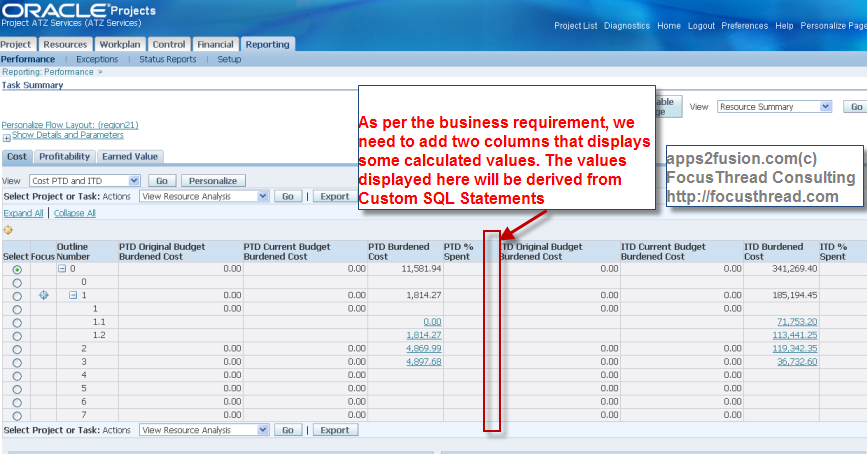
Before we get into details, let’s look at the brief steps for implementing this requirement
1. Define your Custom Measure by giving this a label.
2. Modify pl/sql package PJI_FP_CUST_PJP0. As the name suggests, Oracle expects this package to be customized. Effectively this is a custom hook
3. Personalize the Project Intelligence reporting tab, to add desired custom measures.
What is the purpose of customizing pl/sql API?
In this API, you can populate values into columns in table PJI_FP_CUST_PJP0, for the columns that begin with name CUSTOM.
There are 15 custom columns in this table, i.e. CUSTOM1....CUSTOM15
Will the project intelligence reporting screen display values from the table PJI_FP_CUST_PJP0?
Not really. Data from table is moved into PJI_FP_AGGR_PJP0. Event this table has columns with name CUSTOM1...CUSTOM15
How does data in CUSTOM Column values move from table PJI_FP_CUST_PJP0 to PJI_FP_AGGR_PJP0
You need to run following concurrent processes....
- "PRC: Refresh Project and Resource Base Summaries"
- "PRC: Refresh Project Performance Data"
- "PRC: Update Project and Resource Base Summaries"
- "PRC: Update Project Performance Data"
Do we always need to customize pl/sql package PJI_FP_CUST_PJP0 for adding custom measures?
This depends on your business requirement. Oracle Project Intelligence comes with out of the box seeded measures.
Hence, when you define a custom measure, you can also define a custom measure of type "Computation".
When creating a custom measure of type computation, you can define formulas that reference existing values from seeded measures
In case your business requirements can't be met from seeded measures, then you can customize the pl/sql API so that custom SQL Statements can be written to derive values for custom measures.
Navigate to Projects SuperUser responsibility
Select Menu Custom Measures
In this example, we will use Custom Measure 2 from the available 15 possible Custom Measures
Give a prompt for your custom measures
Given that we are modifying prompt of stored custom measure “Custom 2”, we need to populate the appropriate PTD and ITD values into this column2.
For this, you can write your logic in PL/SQL Package body PJI_PJP_SUM_CUST, as shown below. This pl/sql API is very well documented by Oracle's Project Intelligence product deevlopment team
INSERTINTO PJI_FP_CUST_PJP0 cust_i
(
WORKER_ID,
TXN_ACCUM_HEADER_ID,
PROJECT_ID,
PROJECT_ORG_ID,
………………
………………
)
SELECT
p_worker_id,
pjp0.TXN_ACCUM_HEADER_ID,
pjp0.PROJECT_ID,
pjp0.PROJECT_ORG_ID,
pjp0.PROJECT_ORGANIZATION_ID,
pjp0.PROJECT_ELEMENT_ID,
pjp0.TIME_ID,
pjp0.PERIOD_TYPE_ID,
pjp0.CALENDAR_TYPE,
pjp0.RBS_AGGR_LEVEL,
pjp0.WBS_ROLLUP_FLAG,
pjp0.PRG_ROLLUP_FLAG,
pjp0.CURR_RECORD_TYPE_ID,
pjp0.CURRENCY_CODE,
pjp0.RBS_ELEMENT_ID,
pjp0.RBS_VERSION_ID,
pjp0.PLAN_VERSION_ID,
pjp0.PLAN_TYPE_ID,
TO_NUMBER(NULL) CUSTOM1,
TO_NUMBER('13') CUSTOM2,
--Instead of hardcoding, call
--SQL or PL/SQL Function as per your business needs
--This has been hardcoded for the purpose of demo
TO_NUMBER(NULL) CUSTOM3,
TO_NUMBER(NULL) CUSTOM4,
TO_NUMBER(NULL) CUSTOM5,
TO_NUMBER(NULL) CUSTOM6,
TO_NUMBER(NULL) CUSTOM7,
TO_NUMBER(NULL) CUSTOM8,
TO_NUMBER(NULL) CUSTOM9,
TO_NUMBER(NULL) CUSTOM10,
TO_NUMBER(NULL) CUSTOM11,
TO_NUMBER(NULL) CUSTOM12,
TO_NUMBER(NULL) CUSTOM13,
TO_NUMBER(NULL) CUSTOM14,
TO_NUMBER(NULL) CUSTOM15
FROM
PJI_FP_AGGR_PJP0 pjp0
WHERE
pjp0.WORKER_ID = p_worker_id
;
Compile the package body
After compilation, run the two concurrent processes as shown below
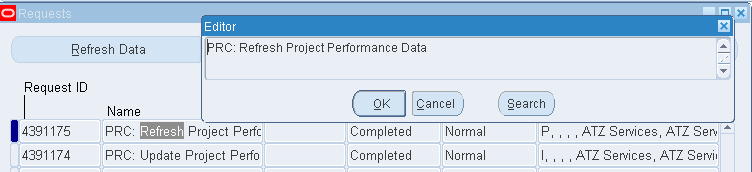
PRC: Update Project Performance Data
PRC: Refresh Project Performance Data
All the steps for Data Preparation have been completed.
Now let us navigate to Project Manager responsibility, where we will do personalization to include the Custom Measure
Search and select a project, in this case ATZ Services
Navigate to Project Intelligence reporting tab
Select Task Summary, and click Go
Click on Personalize to create new view via personalization, so that custom measure can be added
Quickest way to create a View is by duplicating from existing view
Give this view a name, and add the two Custom Measures
Apply the personalizations and navigate to Reporting page.
You will see the custom measures added, with their values coming as per extended pl/sql API.


 Apps2Fusion Articles
Comments
Fantasti c article.
I saw something similiar in R12 Oracle Customers Online (Data Quality Management (DQM) ). Any comments?
Than ks and Regards,
Senthi l
Yes, even in DQM we have custom attributes, but those are for a different purpose, i.e. for indexing [searching &scoring].
Cust om attributes in DQM are used to capture and index values from non-tca locations.
For example, you might want to stage HRMS Person Types of parties in TCA, for which you will define a custom attribute and then point to a custom pl/sql function.
In DQM you can define any custom pl/sql api and reference that.
In PJI- Project Intelligence - Client extensions, you have to use a pre-defined pl/sql API ; similar to HRMS API Hooks or POR_CUSTOM_PKG in iProcurement.
You will find this presentation on DQM useful
www.anilpassi.com/presentations/DQM_TCA.pps
Basic intro of DQM
apps2fusion.com/apps/fm/receivables/130-dqm-a-tca
Thanks,
Anil Passi
PS :- DQM is available in 11i as well :)
Cheers,
Sen thil
CAN I DO THIS IN FINANCIAL INTELLIGENCE ?
REGARDS
Financial intelligence uses DBI, which is different from project intelligence.
F or financial intelligence, you can add Custom dimensions based on Flexfields and other attributes within Oracle applications tables or views or even based on external data sources. This allows a customized new KPI such as “Sales Orders from online Adverts” to be implemented
B elow are the steps from Oracle manual to create custom dimensions in Financial Intelligence.
W hen you create custom dimensions and dimension objects, you should:
• Create dimension objects before you create dimensions.
• Create both dimension objects and dimensions before you create any custom
reports.
To create a dimension object:
1. Using the Daily Business Intelligence Designer responsibility, navigate to
Performance Measurement > Dimension Designer.
2. Click Dimension Objects.
3. Click Create.
4. Define the primary attributes for the dimension object:
• Define the name, internal name, and application. The internal name must be
unique. You should choose a custom application. Enter a meaningful
desc ription for the dimension object to indicate its content and use
• Specify the type of the dimension object to create.
• Dimension objects can be based on existing views or tables available in
your system. This type of dimension object is called an Existing Source
dimensio n object. The view or table used to create this type of dimension
objec t should have ID and VALUE columns. The ID is used as the identifier
for the values in the fact view or summary levels. The VALUE is the name
that appears in the list of values for the parameter.
• Dimension objects can be based on a generated source. This type of
dimension object is called a Generated Source dimension object. The
dimension designer automatically creates a table to support the new
dimension object, so you do not need to use an existing source view.
If you implemented Oracle Balanced Scorecard, then the default type is
Generated Source. To create an Existing Source dimension object, deselect the
Generated Source option.
• Assign the dimension object to a dimension. If no preseeded dimension is
appropriate, finish defining the dimension object; then create a custom
dimensio n and assign the dimension object to it. You must assign a dimension
objec t to a dimension before the dimension object is available for use in custom
reports. See: Create Dimensions, page 3-7.
5. Click Next.
6. Define the display attributes for an Existing Source dimension object.
7. Click Next.
8. Define the attributes for the data source for an Existing Source dimension object.
Source View/Table: Enter the view or table name where the dimension object
values exist. The source view or table must have ID and VALUE columns.
• Source View Object Name: This attribute is reserved for future use.
• Default Value: Specify whether the default value is a fixed value or a value
returned by a PL/SQL function. Enter the value or the function name based on
the selection made.
• Master Dimension Object: This attribute is reserved for future use.
Click Finish to save your work.
A warning message may appear if the source view or table for the dimension object
cannot be found or if the mandatory ID and VALUE columns are not found. You should
validate the source view or table for the dimension object definition before saving the
definition. If a dimension object with data source issues is included in custom reports
and dashboards, then error messages will appear.
For information about creating Generated Source dimension objects, see: Oracle Balanced
Scorec ard Administrator Guide.
Create Dimensions
To create dimensions:
1. Using the Daily Business Intelligence Designer responsibility, navigate to
Performance Measurement > Dimension Designer.
2. Click Dimension.
3. Click Create.
4. Define the name, internal name, and application for the dimension. You should
choose a custom application. Enter a meaningful description for the dimension
indic ating its content and use.
5. Assign dimension objects to the dimension. You must assign a dimension object to a
dimension before you can use the dimension object in a report.
6. Click Apply to save your work.
Thanks,
Anil Passi
Hello, we met at the UKOUG conference this year. Thanks for posting the article above - very clear and useful. I am interested in a very specific requirement that I am not sure is possible using the custom measures. Perhaps you would be kind enough to give me your thoughts about whether you think the following is possible:
All the custom measures are ITD or PTD - there are no YTD measures. Is it possible using the methodology described in your article, in your opinion, to modify one of the custom measures so it will report YTD values on screen? If not is there anyway that you think this may be possible?
Thanks
Barry
You are right, only PTD and ITD are visible when you create a View using personalization .
These values are hardocoded within xml file TaskBreakdownHG ridRN.xml
Quote:
This is certainly a bug, because YTD must be made visible too.
Please raise an SR and request Oracle to provide you a one-off fix to that XML file
You can do to doublecheck this bug
view $PJI_TOP/mds/projperf/reporting/webui/TaskBreakdownHG ridRN.xml
Thanks,
Anil Passi
I read your instruction and it's very informative. But I have a question about on what level you can start your summarization. Let's say we have a flag (flexfield) on each expenditure item indicating if the cost is accepted or not. Is it anyhow possible to only summarize expenditure items which are flagged as accepted in the flexfield? Or are the "flexibility" based on the columns in PJI_FP_TXN_ACCU M_HEADER?
Than ks
Torgny
In reviewing the example... I see an ITD which apparently represent the 13 entered into every historical period for the project?
I am having difficultly finding an example for a fixed ITD value.
Oracle provides a Project and Task On-Hand Inventory value in a view that is always ITD. How do I get this to appear as an ITD value in a custom measure. In your example, it will continue to add 13 on every run in every period.
This was easy to do in the PSI client extension... but here with it appears that any value passed is always incremental.
W e have a number of these ITD values to display.
thanks,
Tuck
In Project superuser resp I cannot open some forms like Scheduled Resource Hours Workbook,
Avail able Resource Hours Workbook,
Overc ommitted Resource Hours Workbook,
Team Role Details Workbook,
Requi red Project Hours Workbook
I get this error :" Not Found The requested URL /discoverer/vie wer was not found on this server."
Pleas e help me as soon as possible
Best wishes
I am working on similar requirement, I compiled this package PJI_PJP_SUM_CUS T after adding my custom SQL code in CUSTOM1 column and I did the rest as suggested.
But the value being displayed in column ITD Financial Stored Custom Measure 1 is not as expected for all the projects.
Kindly let me know if anything is missing
i trying to do many times with a fixed number or functions
but not working
can you help me.
RSS feed for comments to this post