






In this article you will learn from a working example, how to extend view object in OA Framework to add a new field to standard page.
This article will also teach you how this extension can be tested from both jDeveloper and also how this can be deployed to eBusiness Suite.
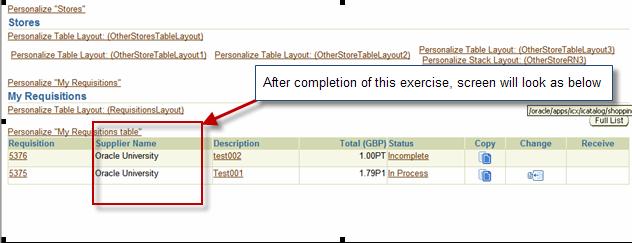
In the iProcurement shopping home page, we need to add Supplier Number field in the “My Requisitions” region.
My requisition region primarily displays the data from PO_REQUISITION_HEADERS_ALL Table.
However it is the table po_requisition_lines_all that contains the vendor id.
In order to add a Supplier Name field here :-
- Create a PL/SQL function that returns comma separated list of Supplier Names against a requisition.
- Extend the View object being used which is MyReqsGlanceVO.
Hence new view object xxgnmMyReqsGlanceVO will be created. xxgnmMyReqsGlanceVO will extend from standard view object MyReqsGlanceVO. - Create substitution in jDeveloper, so that new/extended view replaces standard view object MyReqsGlanceVO
- Run the page from jDeveloper or from eBusiness Suite, so as to personalization the existing region.
By personalization, a new field will be added.
This new field will have a prompt Supplier number. And also, this new field will be mapped to the new view object attribute. - Deploy the changes to application tier
Before making the changes, screen will look as below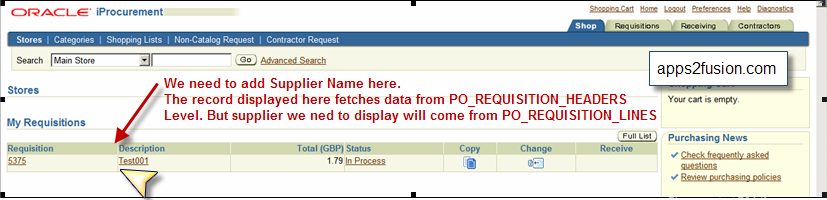
After making the extension change, screen will look as shown below
Use this link to view the complete article in pdf


 Apps2Fusion Articles
Comments
I cant execute it though because we dont have iprocurement installed in our company. I tried using any other application but , its hard to find a VO, with server.xml in the root folder.Oracle doesnt supply server.xml for all the projects
I wasnt able to create server.xml successfully. gave me errors.
May be you could write an article about how to create a server.xml, if its not provided .
Thanks
Jyo
sohbet
manager want to see balance for every employee so that he can take a decsion for approval or not approval.
We add a new text field by personlaization on notifiction page. now i want to modify view pbject behind this so that i can
add new query for returning balance.
Please advise how to modify this page.
Thanks
S hiva
I need to add 2 new fields in my custom OAF page.
My custom page is very simple like one data entry filed then Go button.
Once i enter any data (like %) enter click on the 'Go' its display records.
Now i need to add 2 more filed to display in the same page.
How i can add , what are the files i need to modify( since its already in custom page no need to extend any standard page)
I need to add two fields to the SSHR page “Personal Information”.
I have been looking at UNIX to se what files I could find.
I navigated to /oracle/apps/pe r/selfservice/p ersonalinformat ion.
What kind of files do I need to get from here?
Is there any other files I would have to get as well?
Thanks and regards,
Roy
Did you add those fields using personalziation ? If so, then information goes into JDR% tables.
Cheers ,
Anil
I am able to follow all that you've outlined above. However, I'm struggling with trying to save input data in the field into the database.
The original AM has a method to update the VO. It currently calls a PL/SQL API that updates the field into a table. It is however saving null to the field that I have just made available in my extended VO.
To change that, I extended the AM. Unfortunately, I am lost when I tried to call the getter in my extended VO to put into the setter of the method that calls the API.
Any hints is greatly appreciated.
K eith
I am a completely fan of you.
I have a question. In Forms personalization s, we can launch validations before record,... for implementing our validations about some fields in the form.
That is possible in OAF Framework?
Sor ry about my english.
Regar ds,
Antonio,
I have extended the VO in Receiving Correction page of iproc, but after extending the VO and substituting the original VO with the new VO created.
Though the substitutions are getting reflected on the page ( checked using about page) but the value of this new field is not getting displayed after adding this new field on to the page using personalization .
pls help.
thanks,
shashi.
this matter to be really something which I believe I'd by no means understand.
It sort of feels too complex and very vast for me.
I am taking a look ahead to your subsequent put up, I will attempt
to get the hold of it!
team of volunteers and starting a new initiative in a community in the same niche.
Your blog provided us useful information to work on. You have done a marvellous job!
RSS feed for comments to this post