






It is not recommended to use JDBC Connections from within Controllers.
However, sometimes from within our extended controllers, we have a need to fire some SQL Statements.
You have various options to achieve this, and these are discussed with code samples in this article below.
Option 1
Create a new view object and attach that view object to the Application Module of that page.
Then call the SQL by executing query on "custom view object" from "extended application module"
Cons for Option 1
In this case you will have to extend the Application Module, so as to attach it the Custom View Object.
If the Application Module is Root AM, then such AM may not be extensible.
Option 2
Get the database connection within controller and call SQL Statements or PL/SQL APIs by doing one of the two below
OADBTransactionImpl oadbtransactionimpl = (OADBTransactionImpl)oapagecontext.getRootApplicationModule().getOADBTransaction();
CallableStatement callablestatement = oadbtransactionimpl.createCallableStatement("begin :1 := xx_get_Fnd_user_desc(:2); end; ", 1);
OR
OADBTransaction oadbtransaction = (OADBTransaction)oapagecontext.getApplicationModule(oawebbean).getTransaction();
java.sql.Connection connection = oadbtransaction.getJdbcConnection();
Cons for Option 2
Getting JDBC connection inside the controller is not recommended.
Option 3 - [ Recommened ]
Create the view object on the fly from SQL Statement. This view object will be automatically attached to the Application Module of the page.
In this article, we will see how you can do this.
Lets say our requirement is that, in the extended controller, for a given FND_USER.USER_NAME - we need to find FND_USER.DESCRIPTION
Overview Our steps will be [For Option 3]
1. Extend the controller
2. In the extended controller import these two classes as shown below
import oracle.apps.fnd.framework.OAApplicationModule;
import oracle.jbo.ViewObject;
3. Build the SQL Statement that you wish to execute in a String variable.
IMPORTANT- Ensure that you use Bind Variables as shown in this example below
4. Execute the Query on the View Object
5. Get the desired results from the rows of this view object
Will this dynamically created view object be visible in About this Page?
Yes, this view object will be visible in About this Page Information, as shown below
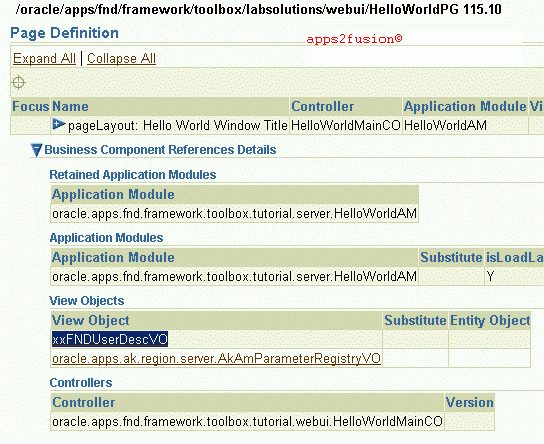
However, in case at the end of the controller method, if you call <viewObjectName>.remove()
then this View Object will not be visible in "About This Page" information
How can I quickly test this functionality?
You can simply copy paste the below code in HelloWorldMainCO, which is the controller
class of HelloWorld OA Framework Page.
I have pasted the modified HelloWorldMainCO as below.
The result of SQL Statement will be visible in "Embedded OC4J Server" log, as shown below
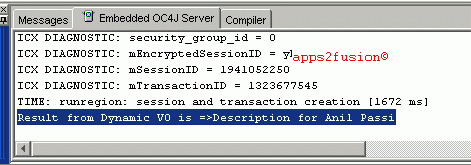
The changes made to Hello World are highlighted in red colour.
You can simply copy paste those lines in red colour for your extended controller.
package oracle.apps.fnd.framework.toolbox.tutorial.webui;
import oracle.apps.fnd.common.VersionInfo;
import oracle.apps.fnd.framework.OAException;
import oracle.apps.fnd.framework.webui.OAControllerImpl;
import oracle.apps.fnd.framework.webui.OAPageContext;
import oracle.apps.fnd.framework.webui.beans.OAWebBean;
//-----------------------------------------------------
import oracle.apps.fnd.framework.OAApplicationModule;
import oracle.jbo.ViewObject;
/**
* Controller for oracle.apps.fnd.framework.toolbox.tutorial.webui.HelloWorldPG
* page.
*/
public class HelloWorldMainCO extends OAControllerImpl
{
// Required for Applications source control
public static final String RCS_ID="$Header: HelloWorldMainCO.java 115.6 2004/01/19 10:14:57 atgopxxOnTheFlyVOQuery noship $";
public static final boolean RCS_ID_RECORDED =
VersionInfo.recordClassVersion(RCS_ID, "oracle.apps.fnd.framework.toolbox.tutorial.webui");
/**
* Layout and page setup logic for region.
* @param pageContext the current OA page context
* @param webBean the web bean corresponding to the region
*/
public void processRequest(OAPageContext pageContext, OAWebBean webBean)
{
super.processRequest(pageContext, webBean);
//First get the Application Module
OAApplicationModule oam = pageContext.getApplicationModule(webBean);
//Lets say I need to get the description of FND_USER Names ANILPASSI
String sWhereClauseValue = "ANILPASSI" ;
//Build the select statement for this on the fly view object
String xxOnTheFlyVOQuery = "select description xxdesc from fnd_user ";
//Specify the Where Clause for the same
xxOnTheFlyVOQuery = xxOnTheFlyVOQuery + "where user_name = :1 ";
//First see if this VO is already attached to view object
ViewObject xxOnTheFlyViewObject = oam.findViewObject("xxFNDUserDescVO");
if(xxOnTheFlyViewObject == null)
xxOnTheFlyViewObject = oam.createViewObjectFromQueryStmt("xxFNDUserDescVO", xxOnTheFlyVOQuery);
//By now we are sure that the view object exists
xxOnTheFlyViewObject.setWhereClauseParams(null);
//Set the where clause
xxOnTheFlyViewObject.setWhereClauseParam(0, sWhereClauseValue);
xxOnTheFlyViewObject.executeQuery();
oracle.jbo.Row row = xxOnTheFlyViewObject.first();
//get the value of description column from View Object record returned
if(row != null)
{
String mSupHierarchyUsed = row.getAttribute(0).toString();
System.out.println("Result from Dynamic VO is =>" + mSupHierarchyUsed );
}
//Remove the view object, as this is no longer required
xxOnTheFlyViewObject.remove();
}
/**
* Procedure to handle form submissions for form elements in
* region.
* @param pageContext the current OA page context
* @param webBean the web bean corresponding to the region
*/
public void processFormRequest(OAPageContext pageContext, OAWebBean webBean)
{
super.processFormRequest(pageContext, webBean);
if (pageContext.getParameter("Go") != null)
{
// NEVER hard-code a message like this in your application. This is just
// shown for the sake of simplicity in this first lesson. In the next
// lessons you'll learn how to define translateable messages.
String userContent = pageContext.getParameter("HelloName");
String message = "Hello, " + userContent + "!";
throw new OAException(message, OAException.INFORMATION);
}
}
}


 Apps2Fusion Articles
Comments
Informativ e post. You make everything so simple.
A thought came to my mind: when I create web beans programmaticall y in the CO, are they shown up in the About this Page? I dont remember seeing them.
So, does the VO come up because it gets picked up from AM (middle-tier) and not built from MDS?
Ritu
Thats right, even I don't rememeber seeing programatically added beans showing up in about this page[I checked on 11.5.10CU2 leve].
Hence it is not ideal to add beans programatically , however sometimes it becomes necessary.
It will be interesting to check if programatic beans become visible in ATP in later version of ATG.
Where possible, we add stacklayouts as Flex regions via personalization . This makes the custom beans visible in about this page.
Thanks,
Anil Passi
FIrst of all thanks for maintaining such a great site like this.
I am new to OA framework,I am using it from past 2 weeks only.
I have a query, I have dine the above example and I am able to get the required data in the controller class.
My requirement is I want to display the data in the page. I didn't find any any solution for this.
Can you please help me out in this.
Thanks,
PrathapReddy
In case you are not deleting the View Object after its creation, then do this...
1. Create a new item of style message text using personalization to that page
2. Map this item to the View Object and its attribute that you created dynamically
A lternately, do this
---------- --------------- ----------
a. Create a new item via personalization and name it xxDisplayField
This will be of style Message Style Text
b. In the controller, processRequest, do this after Dynamic VO Query has been executed
impor t oracle.apps.fnd .framework.webu i.beans.message .OAMessageStyle dTextBean;
OAMe ssageStyledText Bean ombst = (OAMessageStyle dTextBean)webBe an.findChildRec ursive("xxDispl ayField");
//om bst.setText(pag eContext, "Result From Dynamic VO Query Here");
ombst.s etText(pageCont ext, row.getAttribut e(0).toString() );
Thanks,
An il Passi
Thanks for the earlier reply.
I tried in the second way and I have done that.
Onceagain thank you vary much.
Regars--
PrathapReddy.
I very earnestly request you to reply at the earliest possible.
Prob lem: Existing code is crashing due to memory leak in production environment. I have two questions please:
Questi on 1: (Connection Pooling Environment)
OA DBTransaction oadbTransaction = getOADBTransact ion();
using oadbTransaction I create statements and execute.
I close statements but I do not close oadbTransaction and ResultSet.
Does this leak to memory leak?
At one place I forgot to close statement also. That means statement, resultset and oadbTransaction are not close here. Does this leak to memory leak?
Question 2: (Connection Pooling Environment)
In my framework, I used the following stataement:
Co nnection localConnection = oadbTransaction .getJdbcConnect ion();
I do not close the localConnection but I close the statements.
Doe s this lead to memory leak? Does this also lead to out of connections error?
Your prompt response is most appreciated.
R egards,
Frankli n Alagala
9703016 412
I have extended a controller for one of the customer requirements and I am trying to execute a Pl/sql function using Callable Statement.
Here is my code:
//Call the function SSPN_Is_GSPO_or _DOR
//Capture the return value of the function
stmt = "BEGIN :1 := SSPN_Is_GSPO_or _DOR(:2); END;";
try{
callStmt = oadbtransaction .createCallable Statement(stmt, 1);
callStmt.regist erOutParameter( 1, Types.VARCHAR);
callStmt.setStr ing(2, poHeaderMergeVO RowImpl.getAttr ibute("Segment1 ").toString());
if(oapagecontex t.isLoggingEnab led(OAFwkConsta nts.PROCEDURE))
{
oapagecontext.w riteDiagnostics (this, "BEGIN executing SSPN_Is_GSPO_or _DOR Function ", OAFwkConstants. PROCEDURE);
}
callStmt.execut e();
if(oapagecontex t.isLoggingEnab led(OAFwkConsta nts.PROCEDURE))
{
oapagecontext.w riteDiagnostics (this, "END executing SSPN_Is_GSPO_or _DOR Function ", OAFwkConstants. PROCEDURE);
oapagecontext.w riteDiagnostics (this, "Return Value: " + callStmt.getStr ing(2), OAFwkConstants. PROCEDURE);
}
isGSPOorDOR = callStmt.getStr ing(1);
}
catch(Exception e) {
if(oapagecontex t.isLoggingEnab led(OAFwkConsta nts.PROCEDURE))
{
oapagecontext.w riteDiagnostics (this, "Exception encountered while executing SSPN_Is_GSPO_or _DOR Function " + e.getMessage(), OAFwkConstants. PROCEDURE);
}
}
At run time, the function is not getting executed. Instead I am getting an exception saying "Invalid Column Index"
But this function is executing perfectly fine from toad.
Please take a look and let me know if I am doing anything wrong.
Thanks
-Shubh ashree
pls send any process for that
(try ing to avoid 'insert' statements in a controller)
Th anks, I appreciate the information.
I want to send exception error back to caller page of this controller ,below is the code
Please review and give comments on this
if( condition){ throw new OAException("") ;}catch{exce
entirely, but this paragraph presents pleasant understanding
even.
I believe that you need to publish more on this issue, it
may not be a taboo matter but typically folks don't talk about these topics.
To the next! All the best!!
RSS feed for comments to this post