






Part II – Extend Application Module and Controller
This is the second article in the series “Custom Defaulting and Validation in iProcurement”. For the readers who jumped into this article directly, I will outline my objective. The objective of the article is to implement custom defaulting and validation in iProcurement using different approaches I learnt, and limitations of each approach. To illustrate each approach I took a sample requirement of copying a DFF attribute value called ‘Fund’ on requisition header to another DFF attribute in requisition line during checkout process.
In the first article, I used POR_CUSTOM_PKG to implement my requirement. Limitation on when por_custom_pkg is invoked during checkout process restricted me to partially achieve my objective. I could copy fund value when the requisition is first created, any change made to fund later is not copied to fund at line level as por_custom_pkg executes only for the first time requisition is created.
In this article I will use OA Framework extension of Application Module and Controller to implement my requirement. If you are not familiar with OA Framework extension, Anil’s articles on OA Framework are great places to start. Recommended readings Extending AM Part 1, Part 2, and Extending Controller.
Approach 2: Extend AM and Controller using OAF extension
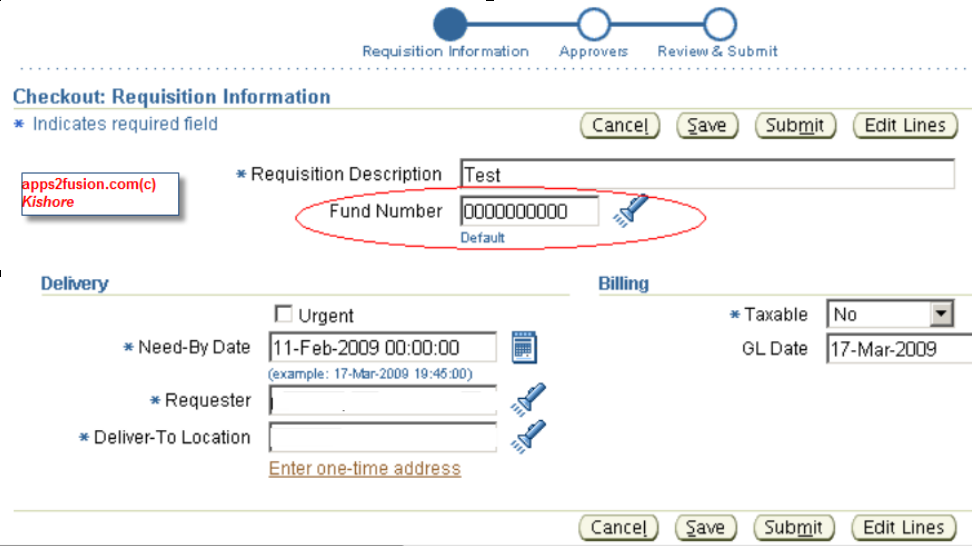
The screenshot below shows fund at header level in “Checkout: Requisition Information” page. I’ve to copy fund value entered by user, to fund attribute in requisition line.
How do I do it?
- Override processFormRequest method by Controller Extension to execute custom code.
- Custom code resides in a new method in extended Application Module. AM is the most logical place to do business validations and defaulting
Before I implement above high level steps, I need to find out BC4J components and Controller used in “Checkout: Requisition Information” page. ‘About this Page’ section is a good place to start.
The pointers on the above image, shows controller ‘CheckoutSummaryCO’, application module ‘RequisitionAM’ and view object ‘PoRequisitonHeadersVO' for Fund Number i.e. Attribute15. Also note that most fields use view object ‘ReqSummaryVO’ as source. The view object for line information is ‘PoRequisitionLinesVO’.
I will follow bottom up approach to create underlying BC4J component i.e. extended AM to call it in controller. Looking closely at process flow on clicking “Edit Lines” button, I came up with how interaction happens between seeded classes.
- ‘Edit Lines’ event is captured in processFormRequest (PFR) method of controller CheckoutSummaryCO. It calls processEditLines method.
- processEditLines calls server command class CheckoutSummarySvrCmd’s method populateAttributesToVOs. This populates VOs PoRequisitionHeadersVO and PoRequisitionLinesVO for requisition header and line respectively from ReqSummaryVO.
Below illustration summarizes the interaction, please note Classes are shown in bold to differentiate them from methods.
PFR in CheckoutSummaryCO > processEditLines > CheckoutSummarySvrCmd > populateAttributes > populateAttributesToVOs
Implementation:
Understanding seeded process helps in planning how to write custom code for copying fund from header to line. Fund attribute in header is stored in PoRequisitionHeadersVO, which holds any changes made to fund value. ReqSummaryVO also has DFF attributes information, but Attribute15 is not reflecting the changes I made on the page. Due to this, when the last step of populating header VO from ReqSummaryVO took place new fund value entered is overwritten with old value. This part is crucial as the user is not seeing the changes they made to fund number.
The custom code will fill this gap, by fetching Attribute15 from PoRequisitionHeadersVO and set the new value to ReqSummaryVO. Later when the seeded code executes, new fund value is copied to header and line VOs which in turn stores in the database. The steps for extending application module are:
- Create XxRequisitionAM to extend oracle.apps.icx.por.req.server.RequisitionAM
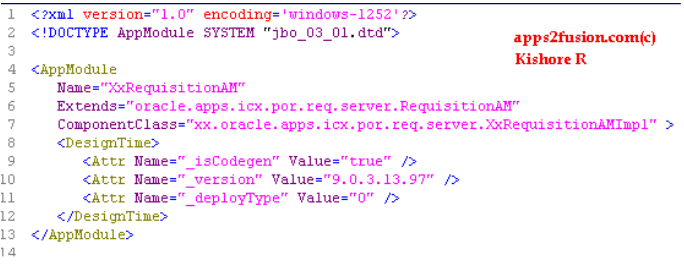
- Create a new method copyFundFromHeader to set Attribute15 value from PoRequisitionHeadersVO to ReqSummaryVO
// Source File Name: XxRequisitionAMImpl.java
package xx.oracle.apps.icx.por.req.server;
import java.io.PrintStream;
import oracle.apps.fnd.common.VersionInfo;
import oracle.apps.fnd.framework.OAException;
import oracle.apps.fnd.framework.server.OADBTransaction;
import oracle.apps.icx.por.common.server.ErrorUtil;
import oracle.apps.icx.por.req.server.*;
import oracle.jbo.domain.Number;
import oracle.jdbc.driver.OracleCallableStatement;
public class XxRequisitionAMImpl extends RequisitionAMImpl
{
public XxRequisitionAMImpl()
{
}
public void copyFundFromHeader()
{
OADBTransaction oadbtransaction = getOADBTransaction();
if(oadbtransaction.isLoggingEnabled(1))
oadbtransaction.writeDiagnostics(this, "*** Custom Code for coping Fund Number from Req Header to Line ***", 1);
try
{
// Fetch new fund value from header VO
PoRequisitionHeadersVOImpl porequisitionheadersvoimpl = getPoRequisitionHeadersVO();
PoRequisitionHeadersVORowImpl porequisitionheadersvorowimpl = (PoRequisitionHeadersVORowImpl)porequisitionheadersvoimpl.getCurrentRow();
String headerFund = porequisitionheadersvorowimpl.getAttribute15();
Number reqHeaderId = null;
String reqSumAtt15 = null;
ReqSummaryVOImpl reqsummaryvoimpl = getReqSummaryVO();
ReqSummaryVORowImpl reqsummaryvorowimpl = (ReqSummaryVORowImpl)reqsummaryvoimpl.getCurrentRow();
reqHeaderId = reqsummaryvorowimpl.getRequisitionHeaderId();
reqSumAtt15 = reqsummaryvorowimpl.getAttribute15();
if(oadbtransaction.isLoggingEnabled(1))
oadbtransaction.writeDiagnostics(this, "BEFORE> reqHeaderId=" + reqHeaderId + ",reqSumAtt15=" + reqSumAtt15, 1);
// set new fund value to Attribute15 of ReqSummaryVO
reqsummaryvorowimpl.setAttribute15(headerFund);
reqHeaderId = reqsummaryvorowimpl.getRequisitionHeaderId();
reqSumAtt15 = reqsummaryvorowimpl.getAttribute15();
if(oadbtransaction.isLoggingEnabled(1))
oadbtransaction.writeDiagnostics(this, "AFTER> reqHeaderId=" + reqHeaderId + ",reqSumAtt15=" + reqSumAtt15, 1);
}
catch(Exception exception)
{
if(oadbtransaction.isLoggingEnabled(1))
oadbtransaction.writeDiagnostics(this, "Error=" + exception, 1);
ErrorUtil.handleFatalException(getOADBTransaction(), exception, this);
}
if(oadbtransaction.isLoggingEnabled(1))
oadbtransaction.writeDiagnostics(this, "*** End of Custom Code for coping Fund Number from Req Header to Line ***", 1);
}
public static final String RCS_ID = "$Header: XxRequisitionAMImpl.java 115.30 2008/11/18 16:40:39 kryali noship $";
public static final boolean RCS_ID_RECORDED = VersionInfo.recordClassVersion("$Header: XxRequisitionAMImpl.java 115.30 2008/11/18 16:40:39 kryali noship $", "xx.oracle.apps.icx.por.req.server");
}
- Substitute RequisitionAM with XxRequisitionAM in ‘Edit Business Components Project’.
- Create controller XxCheckoutSummaryCO which extends oracle.apps.icx.por.req.webui.CheckoutSummaryCO. Override PFR to call copyFundFromHeader method in extended AM, during Edit Lines, Save, and Submit events.
// Source File Name: XxCheckoutSummaryCO.java
package xx.oracle.apps.icx.por.req.webui;
import oracle.apps.fnd.common.VersionInfo;
import oracle.apps.fnd.framework.OAApplicationModule;
import oracle.apps.fnd.framework.webui.OAPageContext;
import oracle.apps.fnd.framework.webui.beans.OAWebBean;
import oracle.apps.icx.por.req.webui.CheckoutSummaryCO;
public class XxCheckoutSummaryCO extends CheckoutSummaryCO
{
public XxCheckoutSummaryCO()
{
}
public void processFormRequest(OAPageContext oapagecontext, OAWebBean oawebbean)
{
OAApplicationModule oaapplicationmodule = oapagecontext.getApplicationModule(oawebbean);
String s = oapagecontext.getParameter("event");
if(oapagecontext.isLoggingEnabled(1))
oapagecontext.writeDiagnostics(this, "processRequest().begin", 2);
if(oapagecontext.isLoggingEnabled(1))
oapagecontext.writeDiagnostics(this, "event=" + s, 2);
if("editLines".equals(s))
customDefault(oapagecontext, oaapplicationmodule);
if("save".equals(s))
customDefault(oapagecontext, oaapplicationmodule);
if("submit".equals(s))
customDefault(oapagecontext, oaapplicationmodule);
if("goto".equals(s))
customDefault(oapagecontext, oaapplicationmodule);
if(oapagecontext.isLoggingEnabled(1))
oapagecontext.writeDiagnostics(this, "processRequest().end", 2);
super.processFormRequest(oapagecontext, oawebbean);
}
protected void customDefault(OAPageContext oapagecontext, OAApplicationModule oaapplicationmodule)
{
oaapplicationmodule.invokeMethod("copyFundFromHeader");
}
public static final String RCS_ID = "$Header: XxCheckoutSummaryCO.java 115.30 2008/10/16 13:31:39 kryali noship $";
public static final boolean RCS_ID_RECORDED = VersionInfo.recordClassVersion("$Header: XxCheckoutSummaryCO.java 115.30 2008/10/16 13:31:39 kryali noship $", "xx.oracle.apps.icx.por.req.webui");
}
- Upload custom files in $JAVA_TOP or $XX_TOP (if it is CLASSPATH, jserv.properties, zone.properties). Run JPXImporter to load substitution into MDS repository and verify it with JDR_UTILS.listdocuments. Bounce Middle-Tier.
- In Checkout: Requisition Information page, Personalize page is used to substitute XxCheckoutSummaryCO.
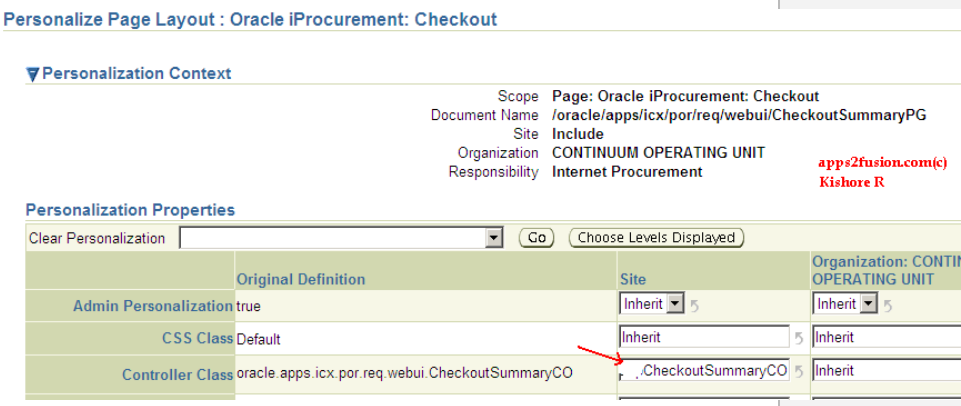
The above approach of extending AM and CO, copies header fund value to line successfully even if changes are made to it after requisition creation.
Limitations:
My triumphal celebrations for solving this issue, lasted a couple of days until I observed an odd behavior with Chart of Accounts KFF Lov in iProcurement. When I clicked on it, KFF page showed up error message with details.
"Error: Cannot Display Page
You cannot complete this task because one of the following events caused a loss of page data:
Your login session has expired.
A system failure has occurred.
Extending root AM is not advisable, unless you know what you are doing. Since I extended root AM, I was loosing session state between main page and Lov region. I tried creating nested Application modules and call it from extended controller, it did not work either because I couldn't get reference to VOs. I read nested AMs are in the same transaction state as root AM, so it may have worked if I had stretched myself to research more. I will cover this in separate article, on how to use nested AMs.
After my failed attempts with nested AMs, iProcurement Architecture Overview document (Metalink Note: 313195.1) came to rescue. It has a section on extending helper classes to do custom validations in iProcurement. My third approach is based on this, which I will cover in the next article.
Update: Writing this article kept me thinking of Application Module Retention Level property. This property indicates how AM should be retained between requests until it is explicitly released. RequisitionAM has retention level as "MANAGE_STATE". I believe I have not set this property for extended application module, when I implemented the above solution. This may be the cause for Lov issue. I will retest it and share the results.
I tested it by setting retention level property for extended AM, I still face the same Lov issue. So there is genuinely something wrong with extension of root AM. If I can get nested AMs working properly, I will have another solution for my requirement.


 Apps2Fusion Articles
Comments
Very good presentation and good thought to extend server cmnds/helper calsses.
Quick question.
Can't we execute code of CopyFundFromHea der() in PFR of CheckoutSummary CO?
I'm just thinking alternative for extending Root AM RequisitionAmIm pl.java .
It is not advisable to access and manipulate VOs/EOs in controller, for sanity sake of MVC architecture.
Kishore
I am not able to see 'About this Page’ in iProcument. How can i enable this? Please advice
I am using 11.5.9
Thanks
Raghavendra Ravilla
I'm not sure with 11.5.9. For 11.5.10, setting profiile "FND: Diagnostics Enabled" will show about this page.
Kishore
$100 to $500 a month extra on the side. Many people place advertisements at
the top spots on search engines prompted Danny Sullivan to coin the term Search engine optimization, contextual advertising, paid placement, and design.
You'll find it next to impossible to index your site.
Here is my page :: http://fluidims.com: http://fluidims.com
I am facing problem in checkoutsummary Page to enable the Task lov. I set the lov bean rendered true,passed the spell true and used the boundvalueutl but no use. Can you please help me in this regard...
Best music download private server: https://0daymusic.org/premium.php
MP3/FLAC, Label, LIVESETS, Music Videos, TV Series.
Best regards,
0day MP3s
It's always helpful to read articles from other writers and use a
little something from other sites.
Also visit my webpage ... i found here (Kindra: http://earnaresidualincome.com/__media__/js/netsoltrademark.php?d=Mp3-Ha.click%2Fmp3download%2Fadexe-amp-nau-en-otro-mundo-diferente.html)
matter, your site got here up, it appears to be like great.
I have bookmarked it in my google bookmarks.
Hello there, just changed into alert to your weblog via Google, and located that it's truly informative.
I'm gonna watch out for brussels. I will appreciate if you happen to continue this in future.
Lots of folks shall be benefited from your writing.
Cheers! aid ukraine: https://www.aid4ue.org/about/
fantastic article to increase my know-how.
aid ukraine: https://www.aid4ue.org/about/
thought this post was good. I do not know who you are but certainly you are going to a famous blogger if you aren't already ;) Cheers!
aid for ukraine: https://www.aid4ue.org/articles/
this web page is in fact excellent.
aid for ukraine: http://www.pagespot.com/__media__/js/netsoltrademark.php?d=monoslide.com%2F__media__%2Fjs%2Fnetsoltrademark.php%3Fd%3Dtogelmaster.org aid
for ukraine: http://i24news.com/__media__/js/netsoltrademark.php?d=Www.Judyjames.org%2F__media__%2Fjs%2Fnetsoltrademark.php%3Fd%3Ds128.asia%26num%3D999%26
ipad and tested to see if it can survive a twenty five foot drop,
just so she can be a youtube sensation. My iPad is
now destroyed and she has 83 views. I know this is totally off topic but I had to share it
with someone!
wp
themes: http://livinglifesadventures.com/__media__/js/netsoltrademark.php?d=www.blogexpander.com
wp themes: http://sweetbronco.com/__media__/js/netsoltrademark.php?d=www.blogexpander.com
RSS feed for comments to this post